fireTMS > Blog > Fuel expense register and other features in fireTMS
Fuel expense register and other features in fireTMS
3 minutes reading
February 7, 2023 / Author: Marcin Borek
With this article, you will learn more about features such as:
Fuel expense register
Collective fuel expense register
Import expenses from a file
Fleet costs report
Fleet profitability report
Fuel expense register
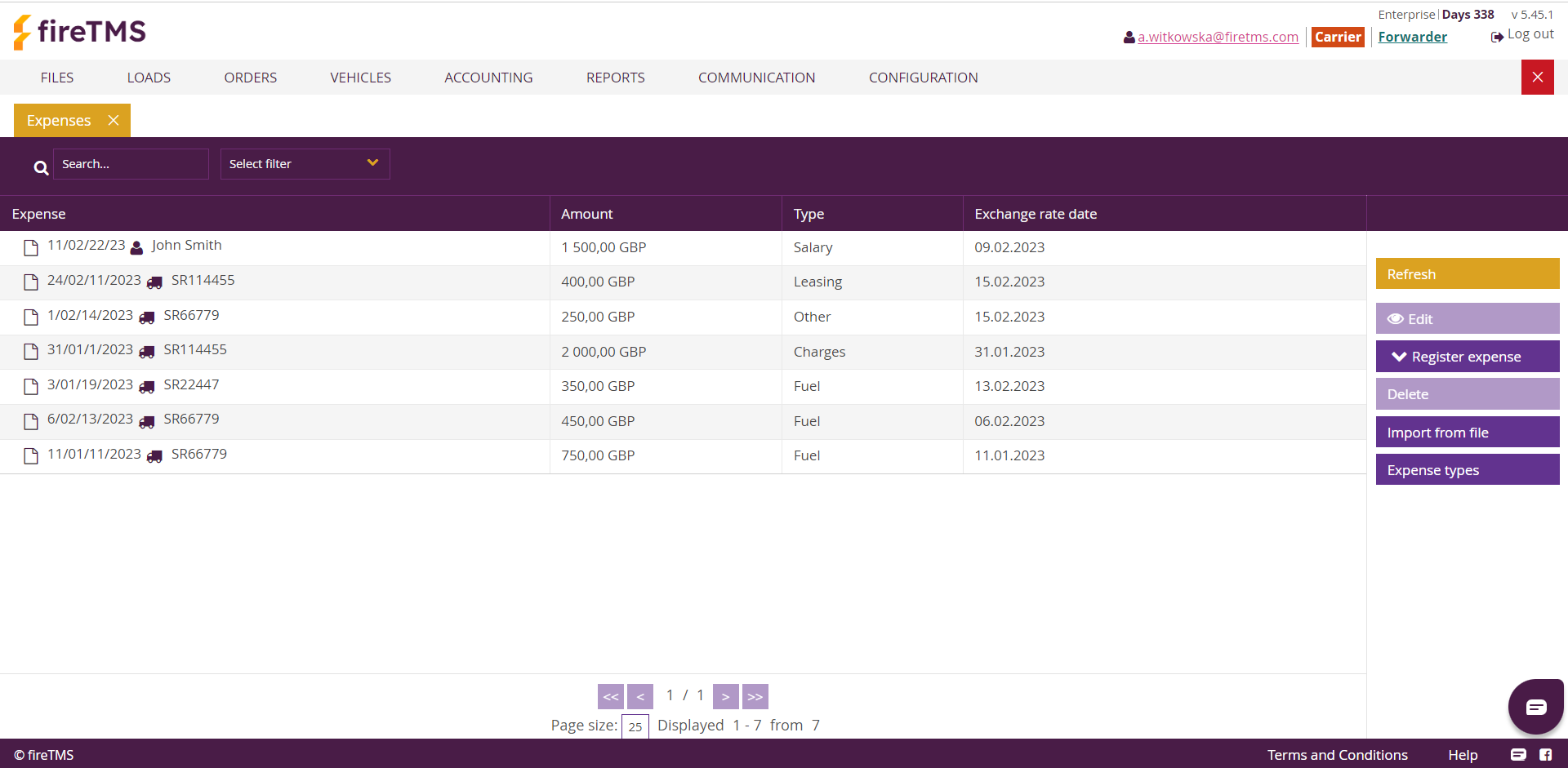
fireTMS enables you to assign fuel costs directly to a given vehicle manually. To register a single fuel cost, you need to go toVehicles >> Expenses >> Register expense >> Register fuel expense.You need to complete the data in the fields – select the specific vehicle to which the cost should be assigned, the currency and the amount, and the document number. In the remaining sections, you need to enter the amount of fuel and the meter status, including the date. Once all the data has been completed, it must be confirmed using the Okbutton. The saved information will be available, for example, in the general view Vehicles >> Expenses.
Collective fuel expense register
When a single collective invoice is received from a contractor, it can be entered through the collective fuel expense register function. This allows specific costs with dates to be assigned to individual vehicles. The data entered will be included in the selected reports.
Import expenses from a file
The „Import expenses from file” function allows data to be loaded from a CSV document. To import them, go to Vehicles >> Expense >> Import from file. Based on this, you can create an import template for fireTMS. This option is available in Configuration >> System configuration >> Transport configuration. At the very bottom, you can find the Configuration of expenses import templates. By clicking the Add button, a customised cost import template is created.
Fleet costs report
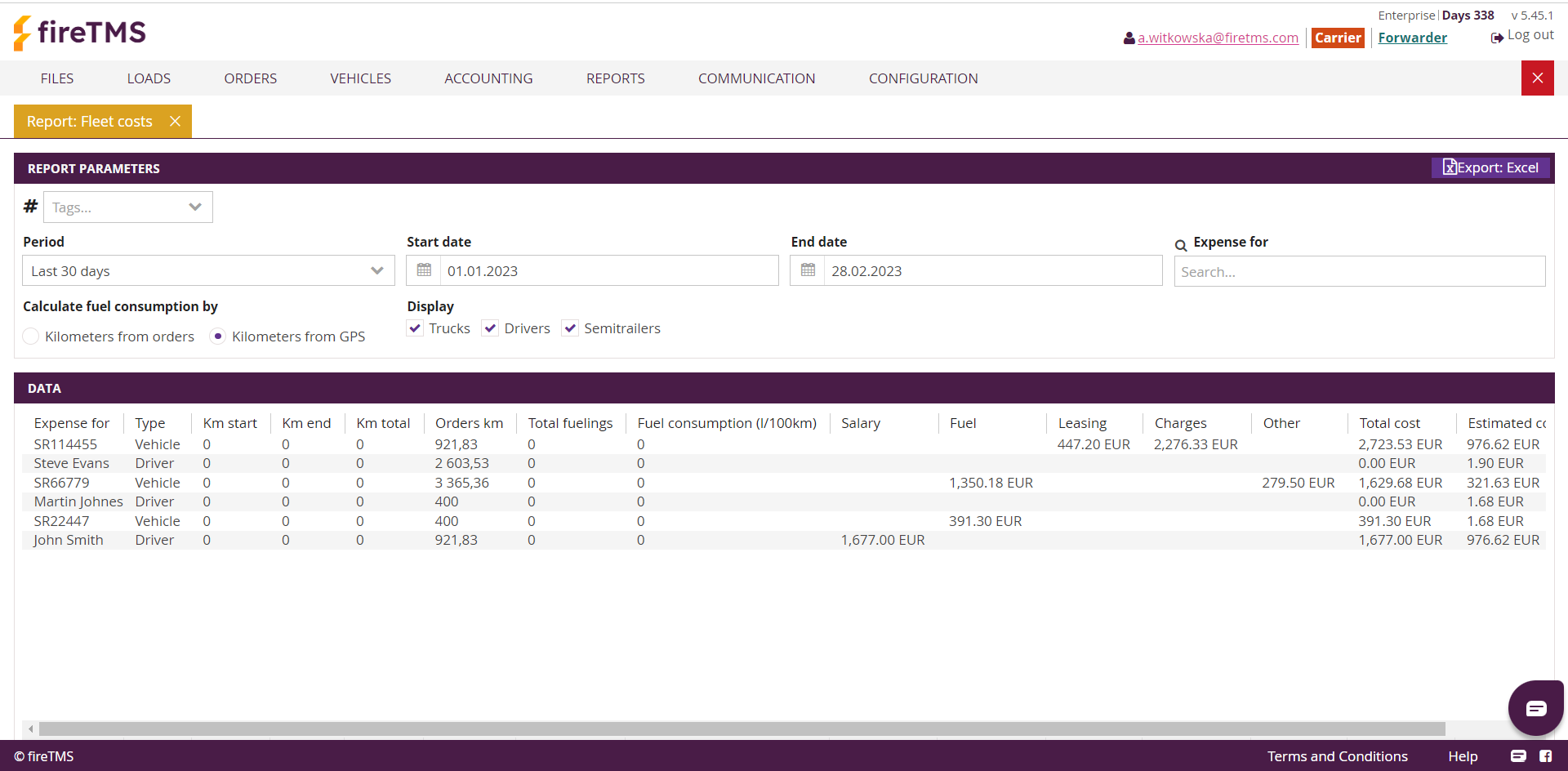
Costs directly assigned to vehicles, drivers and trailers are visible in Reports >> Fleet costs. In addition, the report contains columns Orders km and Estimated cost of order. This makes it possible to calculate fuel consumption in two methods. The first is on the basis of kilometres of the orders, and the second is by using kilometres taken from the GPS (or entered manually).
Fleet profitability report
In the Fleet Profitability report, you can see a summary of data about your own fleet and its usage. This makes it possible to compare the performance of different objects. In addition, the report contains columns Kilometres from orders and Estimated cost of orders, which allow the calculation of indicators such as Income for kilometre, Cost for kilometre, and Revenue for kilometre.By selecting the required option, you can decide whether they will be calculated on the basis of kilometres entered from orders or taken from GPS telematics (or entered manually).
With the detailed information contained in the Fleet Profitability and Fleet Cost reports, it is possible to control the expenses incurred on the fleet. The above features are available on specific plans. You can read more about the reports in ourblog article.
If you would like to find out more about the features that fireTMS provides, please contact us.
Information from fireTMS is as valuable as the cargo
We regularly provide information about our system and on topics in the TSL industry.
Head of Business Development.
Posiada 6-letnie doświadczenie we wdrażaniu systemu TMS w firmach transportowych i spedycyjnych. Lider sprzedaży fireTMS, odpowiada za rozwój biznesowy w Polsce oraz na rynkach europejskich.
In this article, you will learn about the following improvements and new features in the fireTMS system: Sales invoices with an alternative payment currency We have extended the functionality of sales invoices to include the option to specify an alternative payment currency. This option is available when the currency of an invoice line item is […]
Looking for ways to increase revenue and reduce costs in transport operations is one of the biggest challenges for transport business owners. Among these strategies are acquiring better contracts and improving fleet management efficiency. Today, we’ll focus on the latter — exploring strategies for managing a vehicle fleet using GPS technology and mobile applications. What […]
In this article, you’ll learn about the following improvements and new features in the fireTMS system: New Placeholders in Email Templates We’ve added new placeholders that allow you to automatically populate selected data in email templates. Placeholders are special markers that are automatically replaced with the relevant data from the system when an email is […]




 4 minutes reading